Free editor · 2026 edition · No signup
The Harvard resume template, free and online
The single-page layout published by Harvard's Office of Career Services, rebuilt as an in-browser editor. No download, no Word, no template marketplace. Edit in your browser, preview the PDF live, and pay only if you want the clean version without a watermark.
What is the Harvard resume format?
The Harvard resume format is a clean, one-page resume published by Harvard's Office of Career Services. It uses a single column, a Times-family serif at 10–12pt, half-inch margins, and no graphics, photos, or icons. Sections run in this order: header, education, experience, leadership, and skills.
What is — and isn't — free
Always free
- The full editor — every field, every section.
- Live PDF preview as you type.
- Watermarked PDF download (small mark, fully readable — fine for sharing with mentors).
- Magic-link sign-in if you want to save versions.
- ES + EN, browser-saved drafts, edit forever.
Paid (optional)
- Clean PDF without watermark — $3.99 once or a subscription if you're iterating a lot.
- Unlimited clean downloads with monthly ($9.99) or annual ($39) subscriptions.
- Up to 10 saved versions on monthly, unlimited on annual.
No autorenewing trial. No card required to start. We don't ask for an email until you want to save versions or pay.
1. Why the Harvard format is the safe default
When you search “harvard resume template free” you probably want one of three things: a one-page format that recruiters take seriously, a layout you can fill in without fighting Word, or both. The Harvard format — published in Harvard's Resumes & Cover Letters Guide by their Office of Career Services — covers both.
The format is one page, Times-family serif at 10-12pt, half-inch margins, no graphics, no columns, no icons. It looks unremarkable and that's the point. Recruiters at consulting firms, investment banks, top tech companies, academic programs and law firms have learned to read it the way pianists read sheet music — fast, without consciously parsing the layout, focused entirely on the content.
If you submit in this format, the reader spends zero seconds adjusting to your layout and 100% on what you accomplished. That's the entire bet of the Harvard format: subtract decoration so signal stands out.
2. Anatomy of the template (six sections)
The free template renders these six sections in this exact order:
- Header — full name centred in 14pt bold; one line below with email, phone, city/country, LinkedIn URL (or personal site). No photo. No date of birth. No headshot.
- Education first, reverse-chronological. Each entry: institution and location on the left, dates on the right; degree, GPA (if 3.5+), honours, and relevant coursework in a sub-line.
- Experience — three to five entries, each with two to four bullets in the X-Y-Z form (see section 5). Quantify everything: revenue, headcount, percentage, time saved, customers acquired.
- Leadership / Activities — clubs, student government, volunteer roles in which you held a title and produced measurable outcomes. This section differentiates you from peers with similar work history.
- Skills & Interests — four to six technical skills, two to three languages with fluency level, two to three genuine interests. Skip “reading” and “travelling” — be specific (jazz piano, lock sport, alpine skiing).
- Awards (optional) — only if academically or professionally notable. Detur Book Prize and Rhodes Scholar belong; “Employee of the Month” doesn't.
What's deliberately absent: an “Objective” header, a “Professional Summary” paragraph, testimonials, hobbies-as-personality, references, and any graphical elements. None of these add information; all of them add cognitive load.
3. Sample (downloadable)
Here's what the template renders for a strong recent graduate. The free editor produces an identical PDF when you fill in your own data.
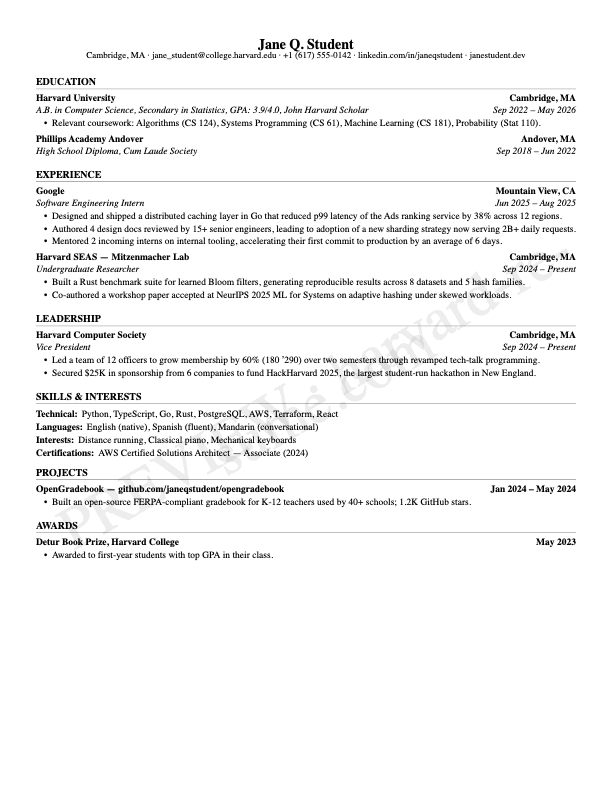
You can open this exact sample in the editor and replace the content with yours. Watermarked download stays free; the clean version is $3.99 if you decide you want it.
“Constraints are the secret weapon of good writing. A one-page resume forces you to know which sentence is the most important one — and put it first.”
4. Build yours in 10 minutes
- Open the editor. harvard-resume.com/en/create — no signup, no card, no email required to start.
- Fill the header. Name, email, city/country, LinkedIn URL. Skip photo / DOB / marital status (standard in some countries, a credibility hit in US/UK/Canada).
- Add education in reverse-chronological order. Start with your most recent degree. Include GPA if 3.5 or higher.
- Add experience with X-Y-Z bullets. The tooltip on each bullet field nudges you toward the formula (see section 5). Quantify everything.
- Trim to one page. The editor warns you if you're overflowing. Cut adverbs first, then weak verbs, then bullets that don't carry quantified results.
- Download the free watermarked preview. Send it to a mentor or a current student in your target program. Iterate based on their feedback.
- When you're happy, download the clean PDF from your dashboard. $3.99 one-time, $9.99/month for unlimited downloads, or $39/year — see pricing.
Auto-save runs in the background. Sign in with a magic link (no password) to keep your résumé synced across devices.
5. The X-Y-Z bullet formula
Harvard's OCS guide describes a bullet pattern that transforms vague responsibilities into measured accomplishments. The formula:
Accomplished X, as measured by Y, by doing Z.
Concrete examples of weak → strong transformations:
Weak
Responsible for managing customer accounts.
Strong (X-Y-Z)
Retained $14M book across 9 Fortune 500 accounts (100% retention rate during 2024 sector downturn) by leading quarterly business reviews and rebuilding the renewal playbook.
Weak
Worked on improving website performance.
Strong (X-Y-Z)
Cut homepage load time from 4.1s to 1.6s (60% faster, ranked top-decile on Lighthouse) by migrating to React Server Components and offloading analytics to edge functions.
Weak
Helped grow user base.
Strong (X-Y-Z)
Grew monthly active users from 11K to 34K (3.1×, $0 paid acquisition) by launching a community-driven referral program and a weekly Slack-native onboarding cadence.
If you can't quantify the Y, the bullet still beats the weak version by leading with the verb and a tangible Z. But the X-Y-Z bullet beats both.
6. Mistakes that get filtered out
- More than one page. The page count is itself a signal of judgment. A two-page resume from someone with less than ten years of experience says “I couldn't decide what mattered”.
- Unquantified bullets. “Responsible for managing client relationships” tells the reader nothing they can grade you on.
- Buzzword soup. “Synergised cross-functional initiatives”, “leveraged strategic frameworks”, “passionate self-starter” — every senior reader has trained themselves to skip these phrases.
- Photo, DOB, or marital status. Standard in some markets (Latin America, parts of Europe); a credibility hit in US, UK, Canada, Australia.
- Inconsistent date format. “Sept 2023 – Present” on one line and “09/2023 – Now” on the next signals haste. Pick one and stick.
- Past tense for current roles. Use present tense for “Present” entries; past tense for completed ones.
- References on the resume. Don't list them. Don't write “References available upon request” either — it wastes a line.
- Decorative templates from marketplaces. Multi-column layouts, sidebars, photo blocks, and skill bars look modern in Canva and read as noise to a recruiter and worse to an ATS.
7. Does this pass ATS?
Yes. The PDF the editor produces has selectable text, no embedded images, no multi-column layout, no exotic fonts, and no header/footer fields (which some ATS misparse). We tested against Workday, Greenhouse, Lever, iCIMS, and Taleo — the parsers used by most Fortune 500 and university recruitment systems.
A small caveat: ATS testing is a moving target because vendors update their parsers. If your application gets stuck at the parser step at a specific employer, the issue is almost never the Harvard format itself but a custom field requirement on their application form. The format passes every parser we've tested.
8. How we compare to free alternatives
The market has roughly four kinds of free Harvard-template offerings. Here's the honest comparison:
Word / Google Docs templates
Pros
Truly free. Fully editable on a desktop.
Cons
Spend a Saturday fighting tab-stops, line spacing, and bullet hanging. Two devices, two different renderings. Photo-of-photocopy quality on export.
Canva / Figma templates
Pros
Pretty visuals.
Cons
Multi-column, sidebars, icons, photo blocks. ATS frequently misparses them. Decorative — opposite of the Harvard intent.
Free resume builders (Indeed, Zety)
Pros
In-browser editor. Hosted PDF render.
Cons
Aggressive upsells. Email gate before you can see your output. Many gate the actual download behind a $24/month subscription that auto-renews.
Harvard Resume (us)
Pros
Editor and watermarked download genuinely free. No email required to start. Clean PDF from $3.99 one-time, no autorenewing trial.
Cons
Clean PDF (no watermark) is paid. ES + EN only. Single template (Harvard).
The trade-off we picked: keep the editor honest and free, sell only the watermark removal. No dark patterns, no surprises in the small print.
Try the editor. Decide on payment later.
Free editor, free watermarked preview download. Pay only when you're ready for the clean PDF — $3.99 once or $39/year.
Open the free editor9. Frequently asked
- What is the Harvard resume format?
- The Harvard resume format is a clean, one-page resume published by Harvard's Office of Career Services. It uses a single column, a Times-family serif at 10–12pt, half-inch margins, and no graphics, photos, or icons. Sections run in this order: header, education, experience, leadership, and skills.
- Is the Harvard resume template really free?
- Editing and the watermarked PDF download are free, forever, no email required. The clean (non-watermarked) PDF is paid: $3.99 one-time, $9.99/month, or $39/year. No autorenewing trial — you only get charged if you click a paid plan.
- Do I need an account to use the editor?
- No. You can build a complete resume and download the watermarked preview as a guest. You only need an account if you want to save versions across devices or pay for the clean PDF.
- Is this the official Harvard template?
- We're not affiliated with Harvard University. The format we implement follows the publicly available Resumes & Cover Letters Guide published by Harvard's Office of Career Services. Our use is descriptive nominative use — see our About page.
- Why is there a watermark on the free PDF?
- Because rendering and hosting cost real money. The watermark version covers our infrastructure cost without paywalling the editor. You can use the watermarked version for feedback rounds with mentors or career coaches — it's fully readable.
- Will this resume pass ATS systems?
- Yes. The PDF has selectable text, single-column layout, standard fonts (Times-family), and no embedded images. We tested against Workday, Greenhouse, Lever, iCIMS, and Taleo.
- Can I customize the fonts or colors?
- Not yet. The whole point of the Harvard format is the format itself — Times-family serif, black text on white, half-inch margins. Customisation would defeat the purpose. We may add subtle variants (Academic, Executive, Technical) on the annual plan in the future.
- Can I download the PDF as Word (.docx)?
- Not currently — the clean export is PDF only. The reasoning: most recruiters and ATS systems prefer PDF (deterministic rendering), and the typesetting of the Harvard format depends on font metrics that often shift in .docx round-trips.
- What if I just want to download a blank Harvard template?
- We don't offer a blank Word/PDF template download because filling one in by hand defeats the value we provide. The editor walks you through each field with examples and the X-Y-Z formula on bullets. If you really only want a blank, the linked Harvard OCS PDF in the related section above has sample layouts you can recreate manually.
- Do you support languages other than English?
- Yes — Spanish (es) and English (en) are both fully supported, including section labels and the editor UI. The PDF respects the locale of the resume content. More languages are on the roadmap based on user requests.
- What happens if I lose my browser data?
- Guests rely on localStorage — if you clear cache, your draft is gone. Signed-in users have everything synced to the cloud automatically. If you're going to spend serious time on a resume, sign in (magic link, no password) so a browser wipe doesn't cost you the work.
Related
- Applying to HBS / Stanford GSB / Wharton? — full guide for the MBA-application version of this template.
- Recruiting at McKinsey / BCG / Bain? — Harvard format for MBB and Tier 2 firms with examples.
- Role-specific examples — engineering, product, finance, medicine, law.
- Pricing — $3.99 one-time, $9.99/month, $39/year.
- About this project — who we are and why we're not affiliated with Harvard.
- Harvard OCS Resumes & Cover Letters Guide (PDF) ↗ — the public document this page describes.